2026 June
DBMS_CLOUD_IMPORT
Migrate from Oracle & non-Oracle Databases to Autonomous AI Database with DBMS_CLOUD_IMPORT
PART ONE: Migration from Oracle Sources
The DBMS_CLOUD_IMPORT is a new package that provides a unified way to import data into the Oracle Autonomous AI Database from Oracle and supported non-Oracle sources, including MySQL, PostgreSQL, and Amazon Redshift. Some of the key benefits include;
A unified data import solution across platforms: Import data from Oracle and non-Oracle databases without using multiple tools.
High-performance data transfer: Move large volumes of data using parallel execution.
Built-in resiliency: Resume import operations automatically after interruptions, including maintenance or a loss of connection to the source database.
Flexible data selection: Import a full database or a subset of data, including specific schemas or tables.
Import is possible across all Oracle databases running in OCI as well as other cloud providers such as Amazon RDS for Oracle. For Oracle sources, both data and database objects are imported whereas the import focuses only on data movement with automatic data type conversion to Oracle-compatible formats for non-Oracle sources. There are however, some prerequisites to take into consideration.
Prerequisites
Ensure the following prerequisites among others are met.
You must be logged in as the ADMIN user.
A DB link is created implicitly as part of the import task which relies on an ADB credential that needs to be created first. You can see the procedure on how to do this on my SQL Developer post. Example;
BEGIN
DBMS_CLOUD.CREATE_CREDENTIAL(
credential_name => 'DB_LINK_TEST',
username => 'HR',
password => '************'
);
END;
/
Ensure network connectivity between the source and target, and that the database specified by service_name can connect to and access the target schema.
Import jobs resume from the point of interruption, such as after a planned maintenance event or an unexpected outage.
The DBMS_CLOUD_IMPORT package includes four procedures;
CREATE_IMPORT_TASK: This creates an import task for importing data from a specified source into Oracle and offers optional filtering by schema or table and scheduling options.
SUSPEND_IMPORT_TASK: This will pause a running import task that can be resumed later.
RESUME_IMPORT_TASK: This procedure resumes a previously suspended import task and continues processing from the point it was suspended.
DROP_IMPORT_TASK: Deletes an import task and removes its associated task definition and metadata.
You call the DBMS_CLOUD_IMPORT.CREATE_IMPORT_TASK procedure with the source DB credentials, connection details, and optional schema/table scope. The Autonomous AI Database then runs the import as a scheduler-managed job that can be monitored through data dictionary views. Oracle-to-Oracle imports include data and database objects, while non-Oracle imports focus on data movement with automatic conversion to Oracle-compatible data types.
In my first test environment, I have an Oracle 19c DB base system on OCI with the sample HR schema which I'll be migrating into an Autonomous AI Database. After creating the CREDENTIAL as shown above, we create and start the import task.
BEGIN
DBMS_CLOUD_IMPORT.CREATE_IMPORT_TASK(
task_name => 'test_import_job',
hostname => 'sourcedb.sub**********oraclevcn.com',
port => '1521',
service_name => 'SPDB.sub**********oraclevcn.com',
ssl_server_cert_dn => ''CN=adwc.eucom-central-1.oraclecloud.com,OU=www.digicert.com,O=Oracle Corporation,L=Redwood City,ST=California,C=US'',
directory_name => 'dci_wallet',
credential_name => 'ADB_CREDENTIAL',
schema_list => '["HR"]'
);
END;
/
To temporarily suspend this task, you can execute the suspend procedure as shown below;
BEGIN
DBMS_CLOUD_IMPORT.SUSPEND_IMPORT_TASK(
task_name => 'test_import_job'
);
END;
/
To resume the suspended task, you can execute the resume procedure as shown below;
BEGIN
DBMS_CLOUD_IMPORT.RESUME_IMPORT_TASK(
task_name => 'test_import_job'
);
END;
/
To delete an import task, as well as its associated definition and metadata, you can execute the drop procedure as shown below;
BEGIN
DBMS_CLOUD_IMPORT.DROP_IMPORT_TASK(
task_name => 'test_import_job'
);
END;
/
You can monitor the progress of your import task at both the task and table levels by querying;
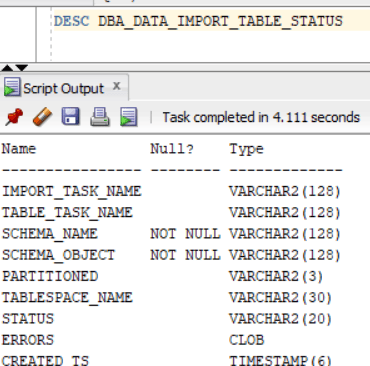
DBA_DATA_IMPORT_TASK_STATUS which shows the progress of the running task, as well as details on its status, percent completion.
DBA_DATA_IMPORT_TABLE_STATUS which shows the progress for each table being imported, including status and error details.
To check the status of our current tasks, we execute;
SQL> SELECT t.import_task_name, s.schema_name, s.schema_object, s.status
FROM dba_data_import_task_status t
JOIN dba_data_import_table_status s
ON s.import_task_name = t.import_task_name
WHERE t.import_task_name = 'TEST_IMPORT_JOB'
ORDER BY s.schema_name, s.schema_object;
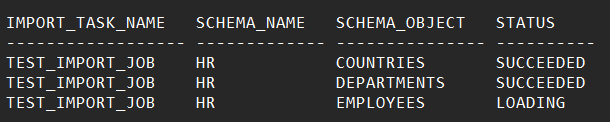
The output;
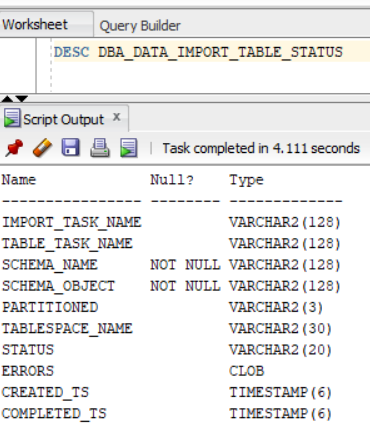
A full description of the table for more details. The status can be SUCCEEDED, LOADING, STOPPED and FAILED.
The procedure above shows how to use DBMS_CLOUD_IMPORT from an Oracle database to the Autonomous AI Database where data and objects are imported. In Part Two, we will look at the same process, but for non-Oracle sources, particularly MySQL. Stay Tuned.
For more information and limitations, please see Oracle Documentation
That's it! Hope you found this helpful.
DBMS_CLOUD_IMPORT
Migrate 3rd-party Databases to Oracle.
Austine Ouma
5/29/2026