2026 May
DBMS_CLOUD_MIGRATION
Translate 3rd Party SQL Syntax to Oracle on Autonomous Database
The DBMS_CLOUD_MIGRATION is an Oracle Autonomous Database PL/SQL package that helps translate SQL written for non-Oracle databases into Oracle SQL. It is really a SQL translation and compatibility support solution, not for moving data by itself despite the “migration” in the name.
You can use this package when migrating applications and you need help converting SQL syntax, DDL, or query patterns. It is useful for testing individual statements, converting SQL scripts, and enabling temporary compatibility while applications are being adapted.
It supports SQL translation from:
PostgreSQL
MySQL
SQL Server
DBMS_CLOUD_MIGRATION provides four main capabilities through the following procedures:
MIGRATE_SQL: translates a single SQL statement into Oracle SQL.
MIGRATE_FILE: translates a file of SQL statements stored in Cloud Object Storage.
ENABLE_TRANSLATION: enables real-time SQL translation so supported non-Oracle SQL can run in Autonomous AI Database.
DISABLE_TRANSLATION: turns off real-time SQL translation for the session.
An example with MySQL code and output:
SELECT DBMS_CLOUD_MIGRATION.MIGRATE_SQL
(
'CREATE TABLE movie (movie_id INT, title VARCHAR(255));',
'MYSQL'
) AS oracle_sql
FROM dual;
Output
CREATE TABLE movie
(
movie_id NUMBER(10),
title VARCHAR2(255)
);
You can also achieve this in the form of a function as shown below.
DBMS_CLOUD_MIGRATION.MIGRATE_SQL
(
original_sql IN CLOB,
source_db IN VARCHAR2
);
RETURN CLOB;
Another example:
SELECT DBMS_CLOUD_MIGRATION.MIGRATE_SQL
(
'CREATE TABLE movie (movie_id INT, title VARCHAR(255));',
'MYSQL'
) AS oracle_sql
FROM dual;
Note: The INT and VARCHAR data types have been translated into NUMBER and VARCHAR2.
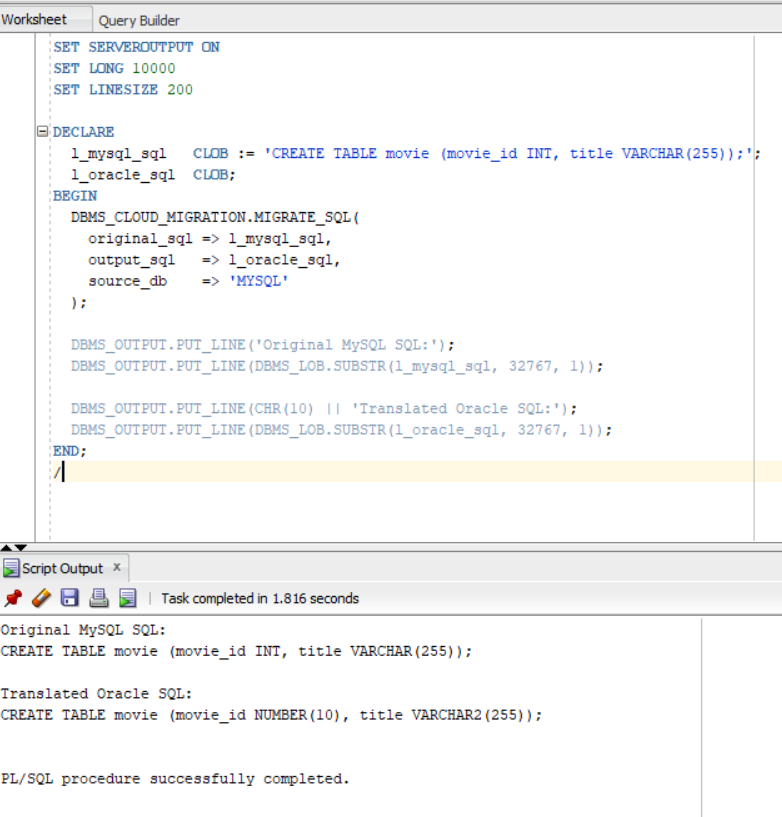
Another example in Procedure form, executed in SQL Developer with output is shown below.
SET SERVEROUTPUT ON
SET LONG 10000
SET LINESIZE 200
DECLARE
l_mysql_sql CLOB := 'CREATE TABLE movie (movie_id INT, title VARCHAR(255));';
l_oracle_sql CLOB;
BEGIN
DBMS_CLOUD_MIGRATION.MIGRATE_SQL
(
original_sql => l_mysql_sql,
output_sql => l_oracle_sql,
source_db => 'MYSQL'
);
DBMS_OUTPUT.PUT_LINE('Original MySQL SQL:');
DBMS_OUTPUT.PUT_LINE(DBMS_LOB.SUBSTR(l_mysql_sql, 32767, 1));
DBMS_OUTPUT.PUT_LINE(CHR(10) || 'Translated Oracle SQL:');
DBMS_OUTPUT.PUT_LINE(DBMS_LOB.SUBSTR(l_oracle_sql, 32767, 1));
END;
/
SQL Developer output
Each MIGRATE_SQL call accepts only one SQL statement. You must be the ADMIN user or have EXECUTE privilege on DBMS_CLOUD_MIGRATION.
To translate SQL Statements in a file which as been stored in an Oracle Object Storage Bucket, you will need to use the MIGRATE_FILE procedure. For MIGRATE_FILE, you also need access to the Object Storage credential used to read or write the SQL file.
Here’s an example:
BEGIN
DBMS_CLOUD_MIGRATION.MIGRATE_FILE
(
credential_name => 'OBJ_STORE_CRED',
location_uri => 'https://objectstorage.us-ashburn-1.oraclecloud.com/n/my_namespace/b/my_bucket/o/mysql_script.sql',
target_uri => 'https://objectstorage.us-ashburn-1.oraclecloud.com/n/my_namespace/b/my_bucket/o/oracle_script.sql',
source_db => 'MYSQL',
params => NULL
);
END;
/
For more information and limitations, please see Oracle Documentation
That's it! Hope you found this helpful.
DBMS_CLOUD_MIGRATION
Translate 3rd-party SQL syntax to Oracle.
Austine Ouma
5/29/2026